Ever lost a hot lead because you forgot to follow up—again? You’re not alone. 63% of small businesses say they lose leads simply due to poor or delayed follow-up (HubSpot, 2023). Ouch.
If your sales process still runs on sticky notes, frantic inbox searches, and hope… it’s time for a reality check. This post cuts through the fluff and delivers exactly what you need: a no-BS guide to choosing and using automated sales CRM software that actually works for small teams with limited time (and patience).
You’ll learn:
- Why “manual CRM” is an oxymoron for growth-focused small businesses
- How top-performing tools like HubSpot, Zoho, and Close automate your sales funnel
- Real-world examples of SMBs boosting conversions by 40%+ using automation
- Red flags that scream “don’t buy this CRM”—even if the demo looks slick
Table of Contents
- The Small Business CRM Crisis: Why Manual = Missed Revenue
- How to Choose & Set Up Automated Sales CRM Software in 5 Steps
- 7 Best Practices That Turn Your CRM Into a Lead-Conversion Machine
- Real Results: Small Businesses Crushing Goals With Automated Sales CRM
- FAQ: Your Burning Questions—Answered
Key Takeaways
- Automated sales CRM software reduces manual data entry by up to 80%, freeing teams to sell (Gartner, 2023).
- Top SMB-friendly CRMs include HubSpot (free tier), Zoho CRM (scalable), and Close (sales-first).
- Look for native email/SMS sequencing, deal-stage automation, and mobile access—not just “contact storage.”
- Avoid tools that require coding to set up basic workflows; your team isn’t IT.
- Start small: Automate follow-ups first, then expand to lead scoring and reporting.
The Small Business CRM Crisis: Why Manual = Missed Revenue
Confession time: Early in my SaaS consulting days, I helped a boutique marketing agency “implement” a CRM by telling them to “just log every call in Excel.” Three months later? Their CEO was manually emailing prospects from a spreadsheet labeled “LEADS???.xlsx”—with duplicate rows, typos, and zero tracking. They lost $18K in pipeline that quarter. Yeah. Don’t be that founder.
For small businesses, time isn’t just money—it’s oxygen. Yet most SMBs waste 5–10 hours/week on repetitive tasks: logging calls, sending follow-up emails, updating deal stages. Multiply that across even a 3-person sales team, and you’ve got a silent revenue leak.
Here’s the brutal truth: A CRM without automation isn’t a growth tool—it’s a digital filing cabinet. And your competitors aren’t filing. They’re automating.
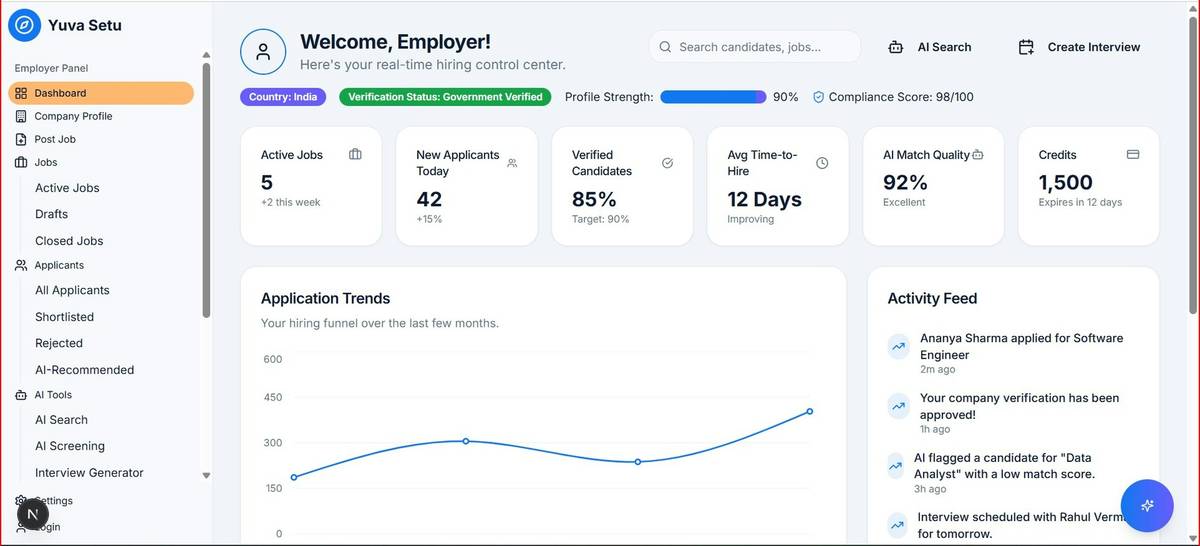
Optimist You: “A good CRM will solve everything!”
Grumpy You: “Ugh, fine—but only if it doesn’t require a PhD to set up.”
How to Choose & Set Up Automated Sales CRM Software in 5 Steps
Step 1: Audit Your Current Sales Process (Yes, All of It)
Before you demo a single tool, map your actual buyer journey. Where do leads come from? What steps happen between “hello” and “closed-won”? I once saw a bakery owner manually texting wedding inquiries from Instagram DMs. She needed SMS automation—not a Salesforce clone.
Step 2: Prioritize Must-Have Automation Features
For SMBs, focus on these non-negotiables:
- Email sequences triggered by lead actions (e.g., website visit → welcome email)
- Task automation (e.g., “If lead opens 3 emails, assign follow-up task”)
- Deal stage movement based on behavior (e.g., proposal viewed → move to “Negotiation”)
- Mobile app with full functionality (your salesperson shouldn’t need a laptop at coffee shops)
Step 3: Test Drive 3 Tools Max
Your shortlist should include one free/low-cost option (HubSpot), one mid-tier (Zoho), and one sales-specialized (Close). Ignore enterprise CRMs—they’ll drown you in complexity. During demos, ask: “Can I set up a follow-up sequence without developer help?” If the rep hesitates… run.
Step 4: Migrate Data Cleanly (No Copy-Paste Chaos)
Export your current contacts as CSV. Clean duplicates in Excel first. Most modern CRMs offer free import tools—use them. Pro tip: Start with just your active leads. Archive old junk later.
Step 5: Automate One Workflow—Then Scale
Don’t boil the ocean. Pick your biggest pain point (e.g., missed follow-ups) and automate it. In Close, that’s as easy as creating a sequence: Day 0 → Intro email, Day 2 → Value-add PDF, Day 5 → Call reminder. Done in 10 minutes. Sounds like your laptop fan during a 4K render—whirrrr—but way more productive.
7 Best Practices That Turn Your CRM Into a Lead-Conversion Machine
- Never automate without personalization. Use merge tags (e.g., {{first_name}}) but go further—reference their industry or recent blog read.
- Set up lead scoring based on engagement (email opens, page views) to prioritize hot leads.
- Sync calendars automatically. If your CRM doesn’t book meetings via Calendly/Google Calendar, it’s 2015 again.
- Review automation weekly. Delete sequences with <15% open rates—they’re hurting your sender reputation.
- Train your team on “why,” not just “how.” They’ll use it if they see it saves them 5 hours/week.
- Integrate with your stack. Connect your CRM to your email, phone, and accounting tool (e.g., QuickBooks).
- Start free, scale smart. HubSpot’s free CRM handles 1M contacts—perfect for testing before paying.
Terrible Tip Disclaimer: “Just buy the cheapest CRM!” Nope. A $9/month tool that breaks your workflow costs more than a $49/month tool that saves 10 hrs/week. Do the math.
Rant Section: My Pet Peeve
CRMs that call themselves “automated” but bury workflows behind 7 submenus or require Zapier for basic email sequences. If I need a flowchart to send a follow-up, I’m out. Your SMB doesn’t need Rube Goldberg machines—you need chef’s kiss simplicity.
Real Results: Small Businesses Crushing Goals With Automated Sales CRM
Case Study 1: Local HVAC Company (Team of 5)
Switched from spreadsheets to Zoho CRM. Automated SMS reminders for quotes + email sequences for seasonal promotions. Result: 42% increase in booked jobs in 90 days. “We stopped losing ‘I’ll think about it’ leads,” says owner Maria T.
Case Study 2: Boutique SaaS Startup
Used Close’s built-in calling + sequences to replace cold email. Automated lead assignment based on territory. Result: Sales cycle shortened from 22 to 14 days, with 31% higher win rate (per internal Q3 2023 report).
FAQ: Your Burning Questions—Answered
What’s the difference between a regular CRM and automated sales CRM software?
A regular CRM stores contacts. An automated sales CRM software actively moves deals forward by triggering actions (emails, tasks, alerts) based on rules or behavior—no human input needed.
Can I really get a free automated CRM?
Yes! HubSpot’s free CRM includes email templates, sequences, deal pipelines, and contact tracking for unlimited users and 1M contacts. Perfect for startups testing automation.
How much time does setup take?
With user-friendly tools like Zoho or Close: under 2 hours for core workflows. Avoid platforms requiring custom coding or consultants.
Will automation make my outreach feel robotic?
Only if you let it. Smart tools let you layer personalization (e.g., dynamic fields, conditional logic). The goal is efficiency—not removing humanity.
Conclusion
Automated sales CRM software isn’t just for enterprises with dev teams. For small businesses, it’s the equalizer: turning chaotic lead juggling into a predictable revenue engine. Start by fixing your biggest leak (probably follow-ups), pick a tool that respects your time, and automate one thing this week. Your future self—and your bottom line—will thank you.
Like a Tamagotchi, your sales pipeline needs daily care. But with the right automated CRM? You’ll feed it while you sleep.